

The supplier list
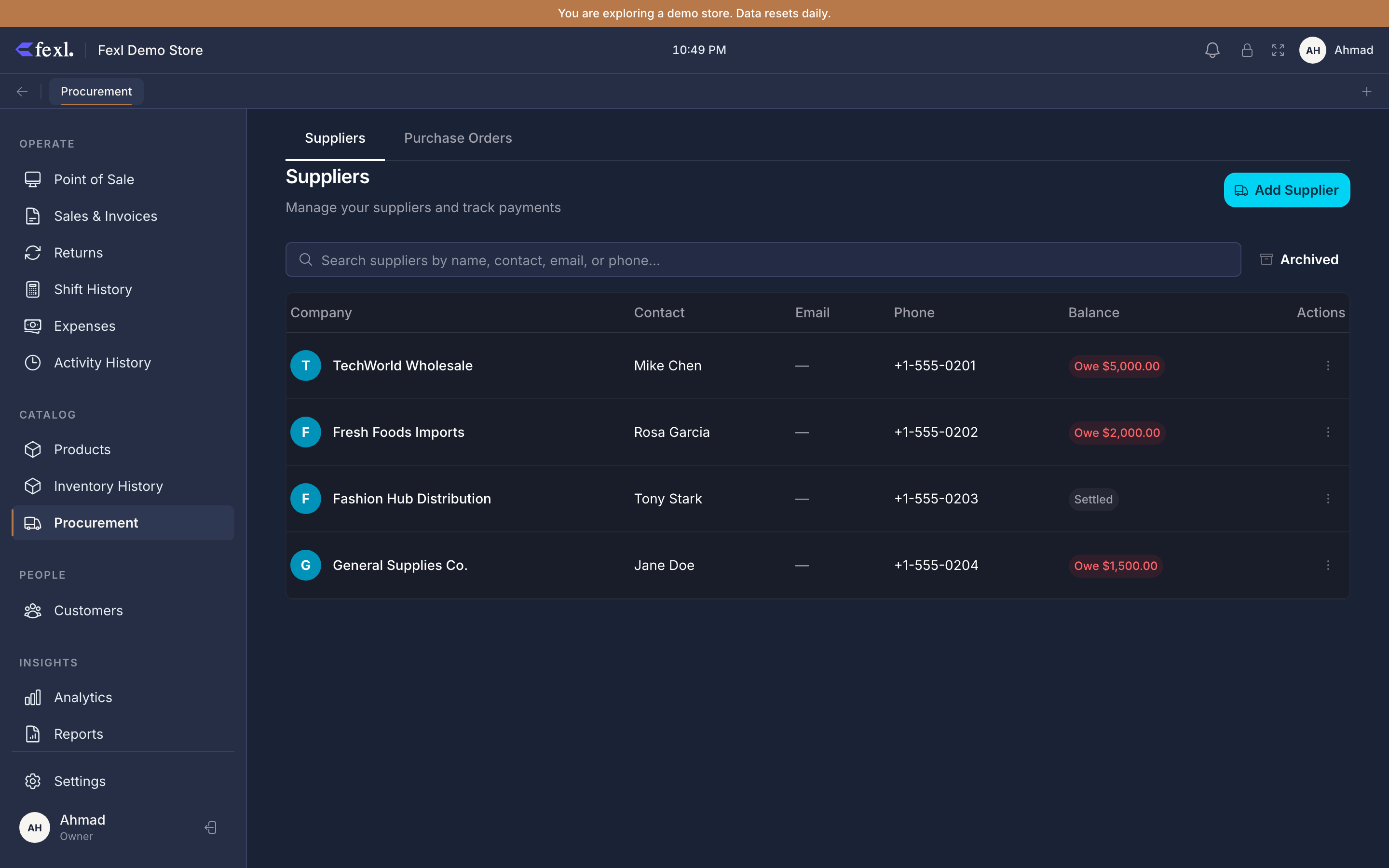
The Suppliers page is the running list of every vendor you buy from. Each row shows one supplier, one balance, and one set of actions — record a payment, view history, edit, archive. It’s deliberately spartan: the page exists to answer “do I owe Hassan’s distributor?” in under three seconds, not to be a CRM.
Columns
Five per row, optimised for scanability:
- Company — supplier name, prefixed with a cyan circle initial. Click anywhere on the row to drill into the supplier detail page.
- Contact — the named individual you deal with. Falls back to
—when blank. - Email and Phone — separate columns; emails truncate at 200px so a long address doesn’t blow out the row.
- Balance — the only number you’ll actually read. A coloured pill:
- Red
Owe <amount>— you owe the supplier. The most common state. - Green
Credit <amount>— the supplier owes you (you over-paid, or they reversed a charge). - Zinc
Settled— exactly zero.
- Red
On mobile (≤640px) the table collapses to cards with the same five fields and a per-card overflow menu.
Search and archive
Above the table sit a search box (matches name, contact, email, or phone — all four columns at once) and an Archived toggle. Archived suppliers are soft-deleted: every payment, PO, and supplier-return record stays in the database for historical lookups, the supplier just hides from the live list. Toggle Archived on to see them; archive a supplier from any row’s overflow menu when you stop trading with them.
Filtering by balance
Click any column header to sort. Sort by Balance descending to surface who you owe the most, or ascending to find the supplier whose credit balance you should burn down first.
Row actions
The overflow menu on each row carries:
- View History — opens the supplier detail page on the Payment History tab.
- Record Payment — opens the supplier payment dialog directly. Permission-gated on
suppliers:manage_payments. - Edit — name, contact, email, phone, opening balance, notes.
- Archive — soft-deletes; reachable from the Archived filter to restore.
How the balance is calculated
The balance pill comes from one formula, evaluated each time the page loads:
balance = openingBalance + Σ payments[type='owed'].amount − Σ payments[type='paid'].amountopeningBalance is whatever you set when you created the supplier (usually zero, but lets you onboard mid-relationship). type='owed' rows are charges from the supplier — every PO receive, every manual Record Owed entry. type='paid' rows are payments you made.
Adjust the opening balance (or post a corrective owed / paid entry) — never edit the balance directly. The page recomputes after every change.
Creating a supplier inline
Two paths in. The Restock dialog and the PO editor both let you type a supplier name into the picker; if there’s no match, the dialog offers Create “<name>” as new supplier and lands the new record straight on this list. The standalone path is Suppliers → New for the full form (name, contact, email, phone, opening balance, notes).
Related
Pay or accrue a balance
The Record Payment dialog and the JE that posts on each transition.
Raise a purchase order
The formal procurement flow — multi-line, extras, landed cost.
Attachments
Drop a supplier invoice or shipping doc onto a PO.
AR/AP Aging
The aged view of every supplier balance over time.