

Trial Balance
The Trial Balance (TB) is the audit summary of the ledger: every account with a non-zero balance, debits and credits in their own columns, sub-totaled by account type. The whole report is built around one invariant — Total Debits must equal Total Credits. When they don’t, the books are broken, and this is the cheapest, fastest place to find out.
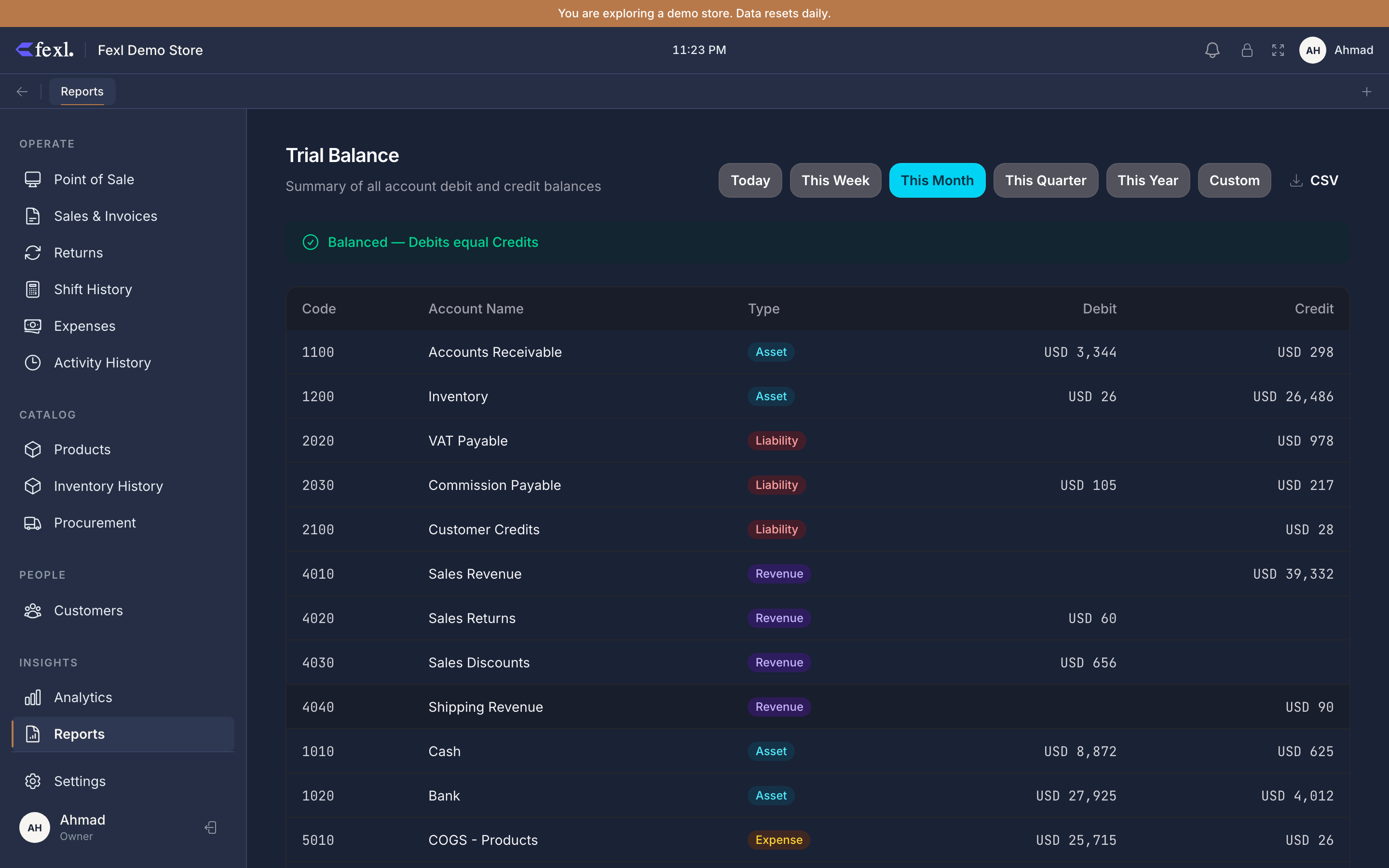
The balance-check chip
At the top of the page sits one chip:
- Green ✓ Balanced — Total Debits equals Total Credits exactly. The ledger is internally consistent.
- Amber ⚠ Off by N — the two totals differ by N. Every other report below is now suspect.
The chip is the first thing to look at when something looks off elsewhere — a P&L net profit you can’t explain, a Balance Sheet where Assets ≠ Liabilities + Equity, an inventory valuation that doesn’t match the 1200 line. If the TB chip is amber, the bug is in the ledger and every report inherits it. Fix the underlying JE first, then re-check.
What’s in the table
One row per account that posted at least one line in the period. Columns:
- Code — the account code (e.g.
1010-006,4010,5010). - Name — the human name.
- Type — Asset / Liability / Equity / Revenue / Expense.
- Debits — sum of debit lines on this account in the period.
- Credits — sum of credit lines on this account in the period.
- Net — debits minus credits (positive for debit-balance accounts, negative for credit-balance).
Account-type sub-totals appear after each block. The Total row at the bottom shows the Total Debits and Total Credits that the balance check evaluates.
Reading the layout
Accounts are grouped by type in a fixed order: Assets, Liabilities, Equity, Revenue, Expense. Within each type, sorted by code ascending — so cash sub-accounts appear in numeric order (1010-001, 1010-002, 1010-006), then 1020 Bank, then 1030 Mobile Money, then 1100 AR, then 1200 Inventory, etc.
The balance side of each account follows accounting convention. An asset account has a debit balance (Debits > Credits is normal). A liability has a credit balance. A normal-shape line item shows the bigger column with the balance and the smaller column with the offsetting reversals.
When the chip is amber
Date range
Standard preset buttons (Today / Week / Month / Quarter / Year / Custom). The TB rolls up everything within the range — opening balances before the start are not included, so a one-day TB is exactly the in-period activity, not the cumulative position. For the cumulative as-of view, run a custom range from the tenant’s start date to today, or read the Balance Sheet which is point-in-time by definition.
TB rows in the e2e suite
Every scenario in the codebase’s e2e test suite asserts on TB account-rows for the post-condition. That’s deliberate: the TB rows are the cheapest catch for an unbalanced JE introduced by a code change, and they pin every account’s expected debit and credit total. If a refactor accidentally double-credits inventory, the TB scenario fails before any other report has a chance to mislead.
Export
The CSV button dumps one row per account — code, name, type, debits, credits, net — in the same order as the page. The Total row appears at the bottom of the file as a final row.