

Multi-cart & hold orders
A customer asks you to wait while they grab one more thing. The next person in line wants to be quick. On a desktop register, Fexl Lite lets you have several carts open at once — park the first one, ring up the second, switch back when the first customer returns. No “merge cart” prompts, no losing what you scanned, no clearing the cart by accident.
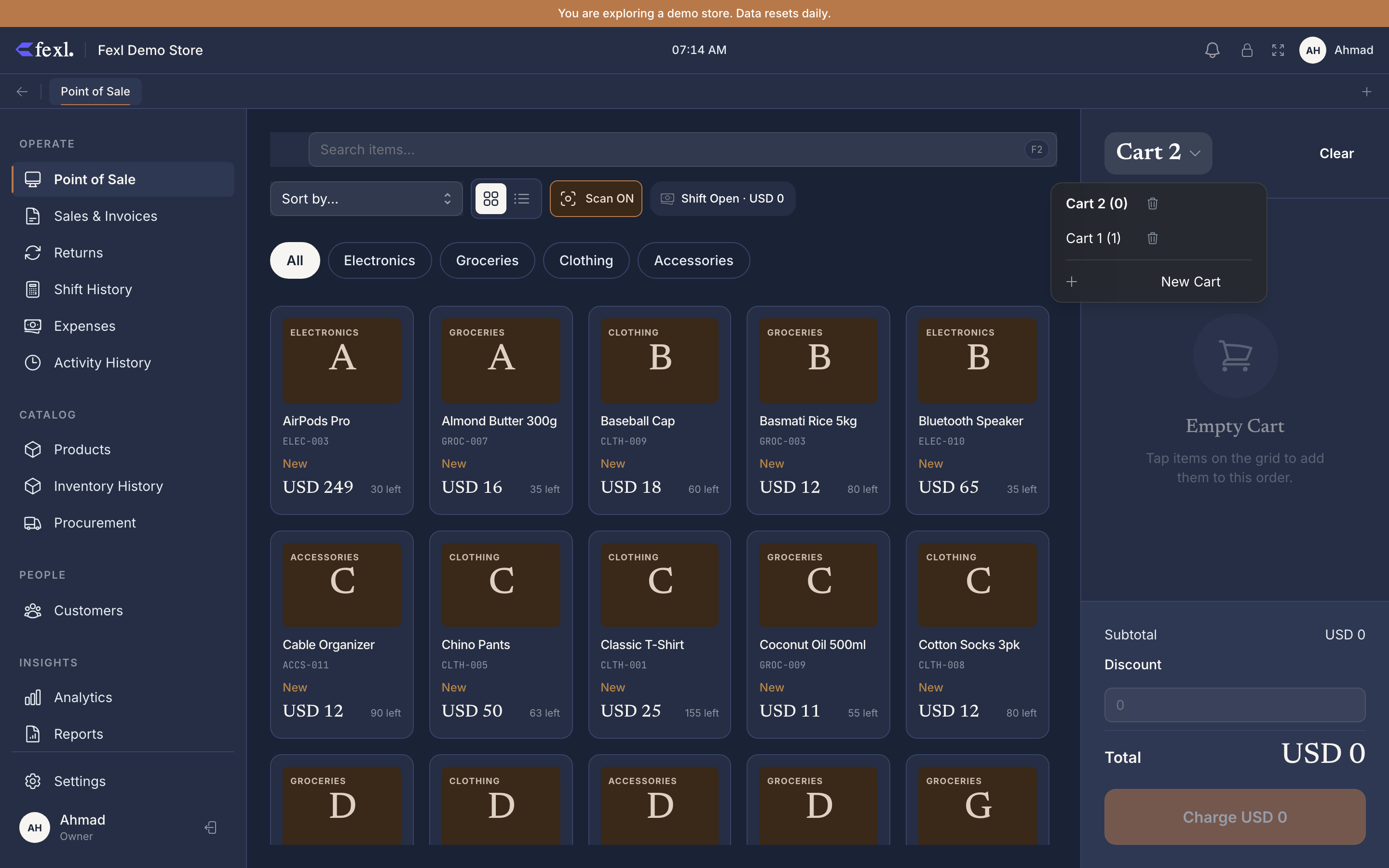
How carts work
The cart-tab strip lives at the top of the cart panel. Each tab is a named cart with its own items, attached customer, delegate, and discount state. The active tab is what scans, taps, and checkout act on. Tabs persist to the server-side carts table — switching devices on the same till keeps the parked carts visible to whoever picks up next.
Park, switch, resume
Click + on the cart tab strip
A new empty cart opens, named Cart 2 by default (or whatever the next number is). The previous cart is still there, still has its items — the tab is just inactive.
Ring the new customer
Scan, tap, build the cart, take payment. Everything works as normal — the parked cart isn’t in your way.
Switch back
Click the Cart 1 tab when the first customer comes back. Their items, customer, discount — all still there. Continue from where you left off and check them out.
Closing a cart without checkout
If a customer walks off, click the × on their tab to discard the parked cart. The items go back to available stock (they were never reserved — Fexl Lite doesn’t lock inventory in the cart, only at the JE). Discarded carts can’t be recovered; if you might need it back, leave the tab open instead.
Shift handoff
Parked carts survive shift changes. The outgoing cashier closes their cash drawer; the incoming cashier opens theirs. Existing parked carts are still on screen — they’re tied to the till, not to the user. If “Mr Hassan’s tab” was open under the morning cashier and Mr Hassan returns in the evening, the new cashier sees and completes the sale.
The invoice JE will be created by — and attributed to — whoever clicks Complete Sale, not whoever opened the cart. The user-activity report tracks both: created_by (the cashier who closed) is what shows on staff performance.
Desktop only
Multi-cart is intentionally desktop-only. On a phone, the cart tabs are hidden — a single cart is the only mode. The reasoning: a phone register is usually one cashier serving one customer at a time; the affordance for “park this and switch” doesn’t fit one-handed use. If you genuinely need parallel carts on the road, run Fexl Lite on a tablet in landscape — that gets the desktop layout and the cart-tab strip.
Limits
- No hard cap, but be reasonable. Five or six parked carts is fine; thirty becomes a usability problem (the tab strip starts to scroll horizontally) and a memory problem on low-end hardware. If you find yourself holding lots of pending tabs, the workflow you actually want is Pay Later — close them as partial-with-paid-zero and let the customer detail page hold the unpaid balance.
- No cart sharing across tills. Two registers in the same shop have independent cart strips. Carts don’t roam.