

Pay debt
A customer with outstanding debt comes back to settle. They hand you cash (or tap a card, or transfer), and you record the payment from their detail page. Fexl Lite allocates the amount across their open invoices oldest-first, posts one journal entry, and updates the running statement. This page is the full mechanics of that flow.
The flow
Open the customer
From Customers, click the row (or use the Pay Debt action in the row’s overflow menu to skip the detail page entirely). The header shows the net balance badge — yellow Owes <amount> is the cue this is the right customer.
Click Pay Debt
The dialog opens with the customer’s outstanding total at the top, broken down by source — open invoices listed oldest-first, plus any opening balance carried from migration.
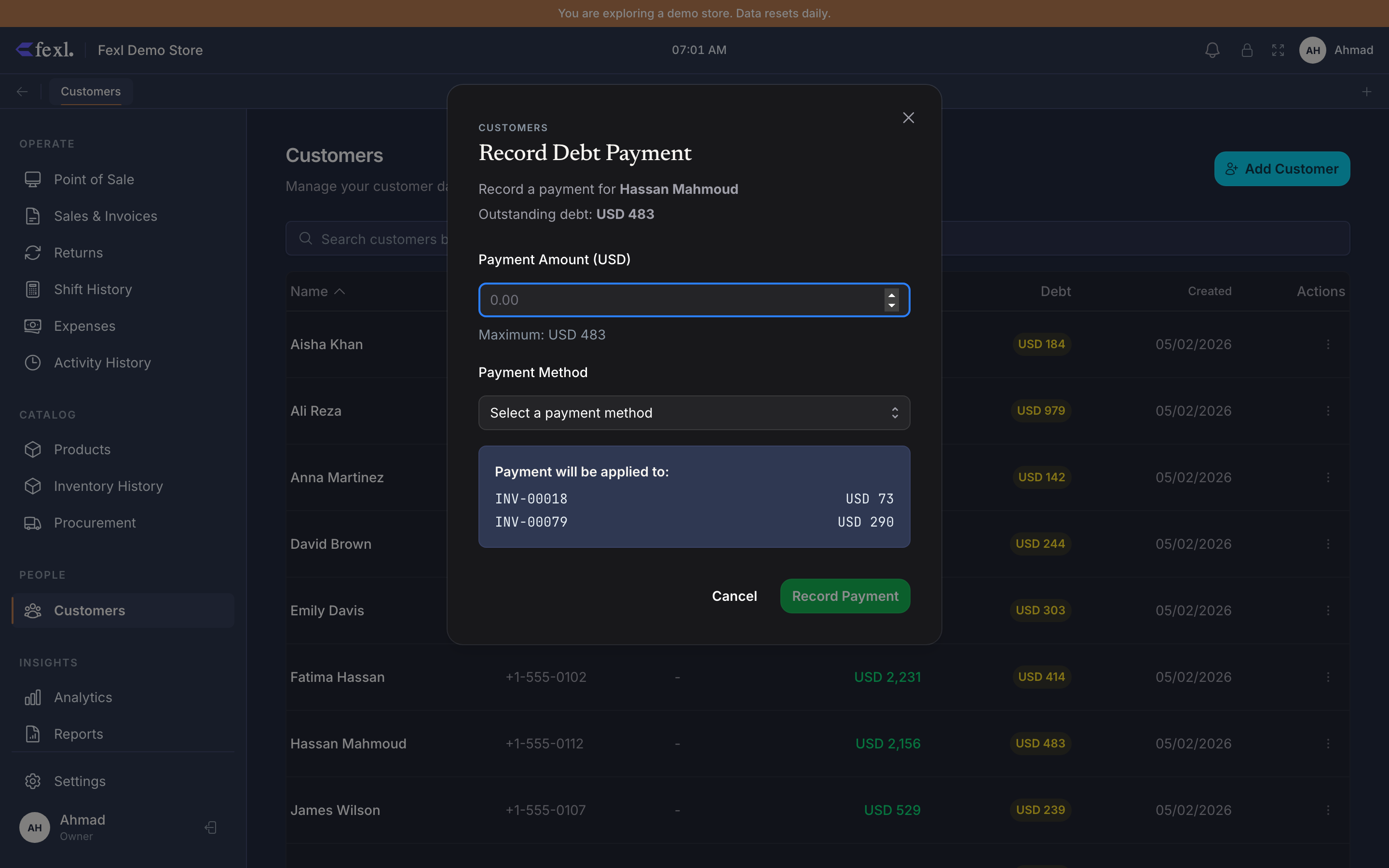
Enter the amount and pick a method
Enter what the customer is paying. The dialog validates against the gross debt — overpaying is blocked here (use Withdraw credit afterwards if the customer wants the excess as store credit instead). Pick the payment method from the configured list.
Confirm
The payment posts atomically — one journal entry, one customer-balance update, one shift transaction (when applicable). The dialog closes, the badge recolors (still yellow if any debt remains, gone if zero, cyan if the customer flipped into credit territory).
FIFO allocation across invoices
Fexl Lite allocates the payment across the customer’s open invoices oldest-first. Concretely:
- Sort the customer’s invoices with
amountOwed > 0ascending bycreatedAt. - Apply the payment to the oldest invoice first — drain its
amountOwedto zero, then move to the next one. - If the payment exceeds total invoice debt, the remainder applies to
openingBalance(the migration-time legacy debt field). - If the payment still has remainder after
openingBalancereaches zero, the remainder is rejected — the dialog blocks overpay before submit.
This is what makes the AR Aging report correct over time: oldest debt clears first, so the buckets (0-30 days, 30-60, 60-90, 90+) drain in age order rather than randomly.
Multiple invoices settled in one payment
A common case: customer has three open partial invoices (200, 150, 300 — total 650) and pays 500. After the payment:
- Invoice #1 (200, oldest):
amountOwed200 → 0 (settled). - Invoice #2 (150):
amountOwed150 → 0 (settled). - Invoice #3 (300, newest):
amountOwed300 → 150 (still open, partially paid).
balance goes from 650 → 150. Net badge re-renders. The statement shows one row for the payment with Allocation: #INV-001 200 + #INV-002 150 + #INV-003 150.
What posts to the books
For a 500 cash debt payment:
- DR 1010-xxx (cash sub-account on the active shift)
- CR 1100 (Accounts Receivable)
Both legs at the same amount; no revenue, no COGS — debt payment is a balance-sheet move, not a P&L event. The original sale’s revenue was already recognised when the partial invoice posted.
If the customer chose Store credit as the payment method (only available when creditBalance > 0), the JE shape changes:
- DR 2100 (Customer Credits) — drains their credit
- CR 1100 (Accounts Receivable) — drains their debt
Same balance-sheet move, no cash drawer impact. See Debt & credit for why this is different from withdrawing credit and re-paying with cash.
Where it shows up afterwards
- Customer detail → Statement tab — one row, dated to the payment, with the running balance reduced by the amount.
- Customer list — net-balance badge updates immediately.
- AR Aging report — buckets shrink in oldest-first order.
- Cash drawer report —
cash_inrow on the active shift for the cash sub-account. - Trial balance —
1100debit balance shrinks;1010-xxxdebit balance grows.