

General Ledger
The General Ledger (GL) is the audit trail behind every other report. Every journal-entry line, every account, every date — sorted chronologically with a running balance. If a number on the P&L, Balance Sheet, or Trial Balance looks wrong, the GL is where you find the posting that put it there.
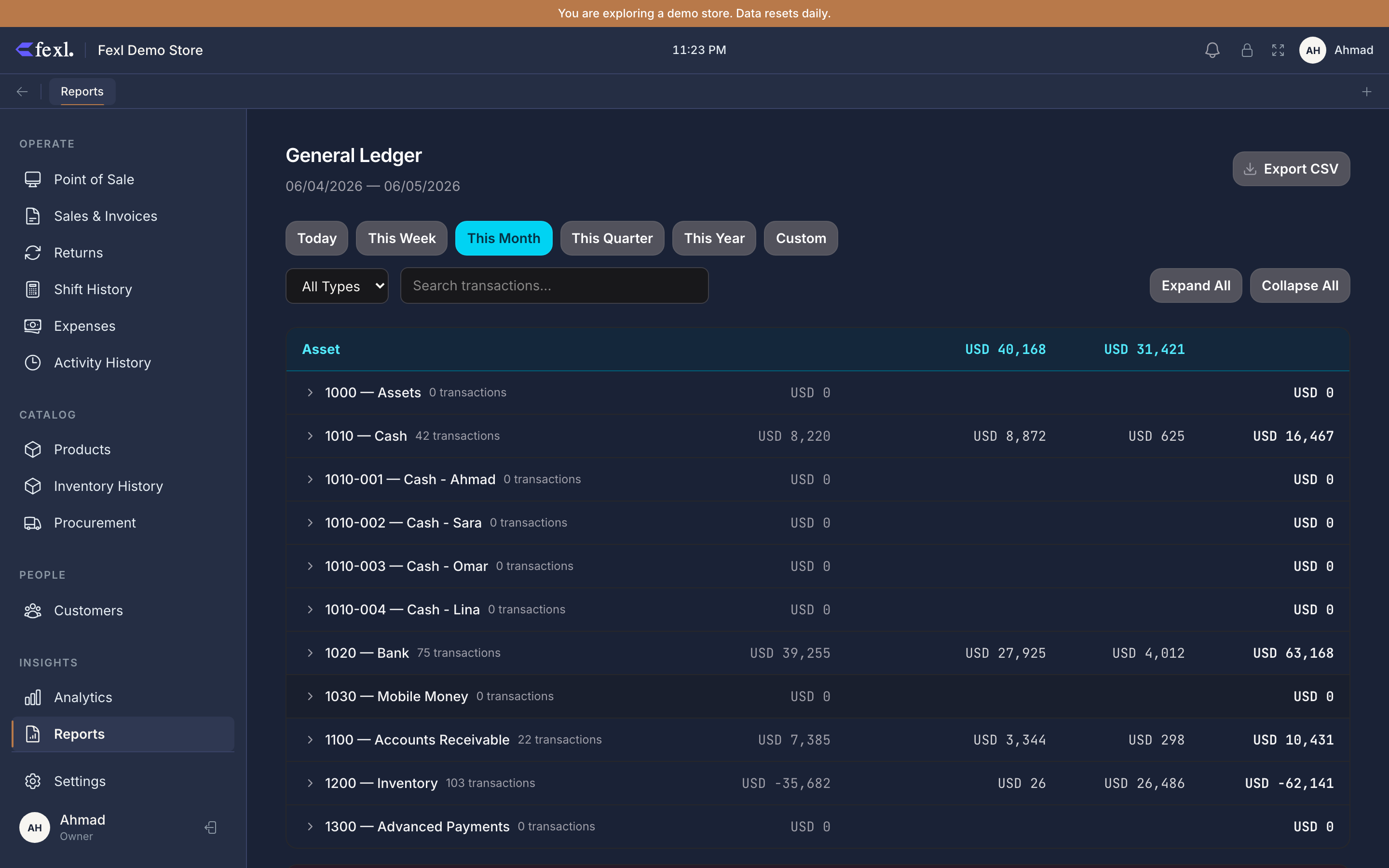
What’s in the GL
Each account has its own collapsible section with an opening balance, a chronological list of every line that hit the account in the period, and a closing balance. The columns:
- Date — accounting date of the journal entry.
- Entry # — the JE ID. All lines with the same Entry # belong to one transaction.
- Description — per-line description where set (e.g. “Bonus inventory relief”), falling back to the parent JE description.
- Source — what produced the line: invoice, refund, cancel, expense, restock, payment, transfer, manual.
- Debit / Credit — exactly one is filled per line; every JE balances debits to credits.
- Balance — running balance after this line, starting from the opening balance.
Each account-type group (asset, liability, equity, revenue, expense) has its own subtotal header.
Filtering
- Date range — preset buttons (Today, This Week, This Month, This Quarter, This Year) or a custom start/end. The opening balance is everything posted before the start date, so a one-day window still gives a complete picture.
- Account type — limit to one of asset, liability, equity, revenue, expense. Useful when auditing one side of the books.
- Search — filters rows by description or Entry #; account sections with no matches disappear and per-section totals recompute.
Expand All / Collapse All flip every section. Export CSV dumps the currently filtered rows, one per JE line.
Reading a JE block
A single transaction posts as multiple GL lines that share one Entry #. A typical cash sale hits four: DR cash, CR revenue, DR COGS, CR inventory — each under its own account section, all with the same Entry # and date. A sale with a bonus item splits inventory relief into two lines on account 1200 (sold-product relief and bonus relief), still one transaction.
Source types
The Source column names the subsystem that produced the line:
- invoice — a POS sale or manual invoice (cash, revenue, COGS, inventory, VAT, commission).
- refund — a return through the refund wizard; reverses revenue/COGS and re-ingresses resaleable stock.
- cancel — invoice cancellation; mirrors the sale leg-for-leg, dated to the original sale.
- expense — recorded on the Expenses page.
- restock — a purchase order received or a manual stock adjustment.
- payment — a customer debt payment or a payment to a supplier.
- transfer — cash moved between sub-accounts (drawer hand-off, end-of-day deposit).
- manual — a hand-posted journal entry from the accounting page.
A line with an empty Source is usually a manual JE that didn’t set source_type — not a bug, but it has no automated origin to drill back to.
Related
- Trial Balance — the GL summed per account; the cheapest cross-check that debits equal credits.
- Balance Sheet — assets, liabilities, equity over the same JE history.
- Profit & Loss — revenue and expense activity over a period.
- Journal Entries — the underlying JE records the GL reads from.
- Chart of Accounts — every account that can appear here, by code.