

Cash Drawer Report
The Cash Drawer Report is the auditor’s view of every shift in the date range. Where the Shift History page shows one row per session, this report aggregates them — by user, by sub-account, by day — so a recurring half-pound shortage on AboYahya’s drawer becomes a pattern instead of an anomaly.
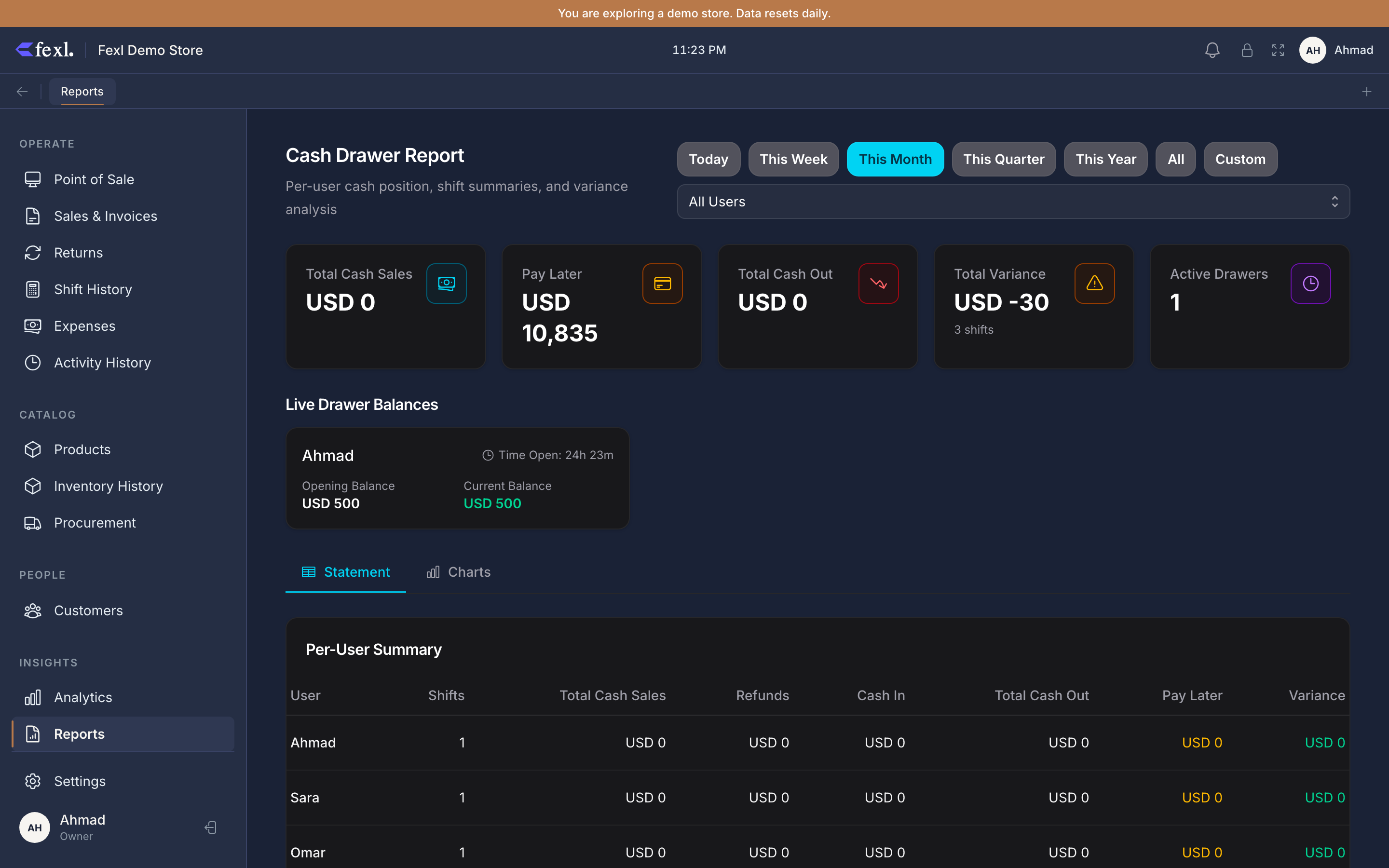
The summary cards
Five headline numbers across the top of the page, each summed over the date range and filters:
- Total Sales (cash) — sum of every
cash_drawer_transactionsrow withtype='sale'. This is the cash leg only — split-payment cards or bank transfers from the same invoices don’t contribute. - Refunds —
type='refund'. Cash given back to customers. - Expenses —
type='expense'. Petty cash spent on bills, supplies, transport. - Net Cash — sales minus refunds minus expenses, plus cash-in adjustments minus cash-out adjustments. The net movement of physical cash for the period.
- Variance — sum of closed-shift variances in the period. Should hover near zero; large or one-sided values are the signal.
Per-shift breakdown
Below the cards is a row-per-shift table:
- Opened / Closed timestamps.
- User — who opened it.
- Sub-account —
1010-001,1010-006, etc. The drawer this shift was bound to. - Opening — opening balance the cashier counted.
- Sales / Refunds / Expenses / Adjustments — totals from the cash transactions.
- Expected — opening + sales + cash-in − refunds − expenses − cash-out.
- Actual — counted closing.
- Variance —
actual − expected, signed.
Click a row to land on the Shift History detail panel for that session.
Filters
- Date range — Today / Week / Month / Quarter / Year / Custom. Default is This Month.
- User — narrow to one cashier. The summary cards recompute for that user only.
- Sub-account — narrow to one drawer. Useful for the AboYahya → Osama pattern: filter to
1010-006to see only AboYahya’s collection till.
The cash sub-account drilldown
The sub-accounts on the filter list are the tenant’s 1010-* codes — see Sales settings — Cash & Drawer for how they’re configured.
Variance trends
The Variance column on each row is signed:
- +n (green) — more in the till than expected. Causes: missed cash-in, customer overpayment that wasn’t applied, a rounding-up cashier.
- −n (rose) — less than expected. Causes: missed cash-out, refund posted but not given, miscounted opening, skim.
- 0 — square. The shift count matched the expected.
Pre-v1.6.100, the variance column was computed transactionally and could disagree with the per-shift detail page. Post-fix, both surfaces read from the same cash_drawer_sessions.variance column — written at close time and never recomputed. What you see on this report is what was written when the cashier confirmed the close.
Reconciling against the Balance Sheet
The Net Cash card on this report is not the same number as Cash & Equivalents on the Balance Sheet — Net Cash is per-period flow; Cash & Equivalents is the as-of balance, accumulated since day one. They don’t match directly.
What you can reconcile: pick a date range, run this report, take Net Cash; pick the same end date on the Balance Sheet, take 1010 Cash; difference should equal whatever 1010 Cash was on the day before the range started, which you can read off a Balance Sheet run for that earlier date.
Export
The CSV button dumps the per-shift table — one row per shift, all columns above plus a Notes column carrying the variance note the cashier left at close.