

Handoff Gap Alerts
A handoff gap is what happens when consecutive shifts on the same drawer disagree on the count. The previous shift closed with $812 actual; the next one opens by counting $755. There’s no cash-out, no transfer, no expense to explain the missing $57. Fexl Lite flags this automatically — and the alert is the start of a reconciliation flow, not the end of one.
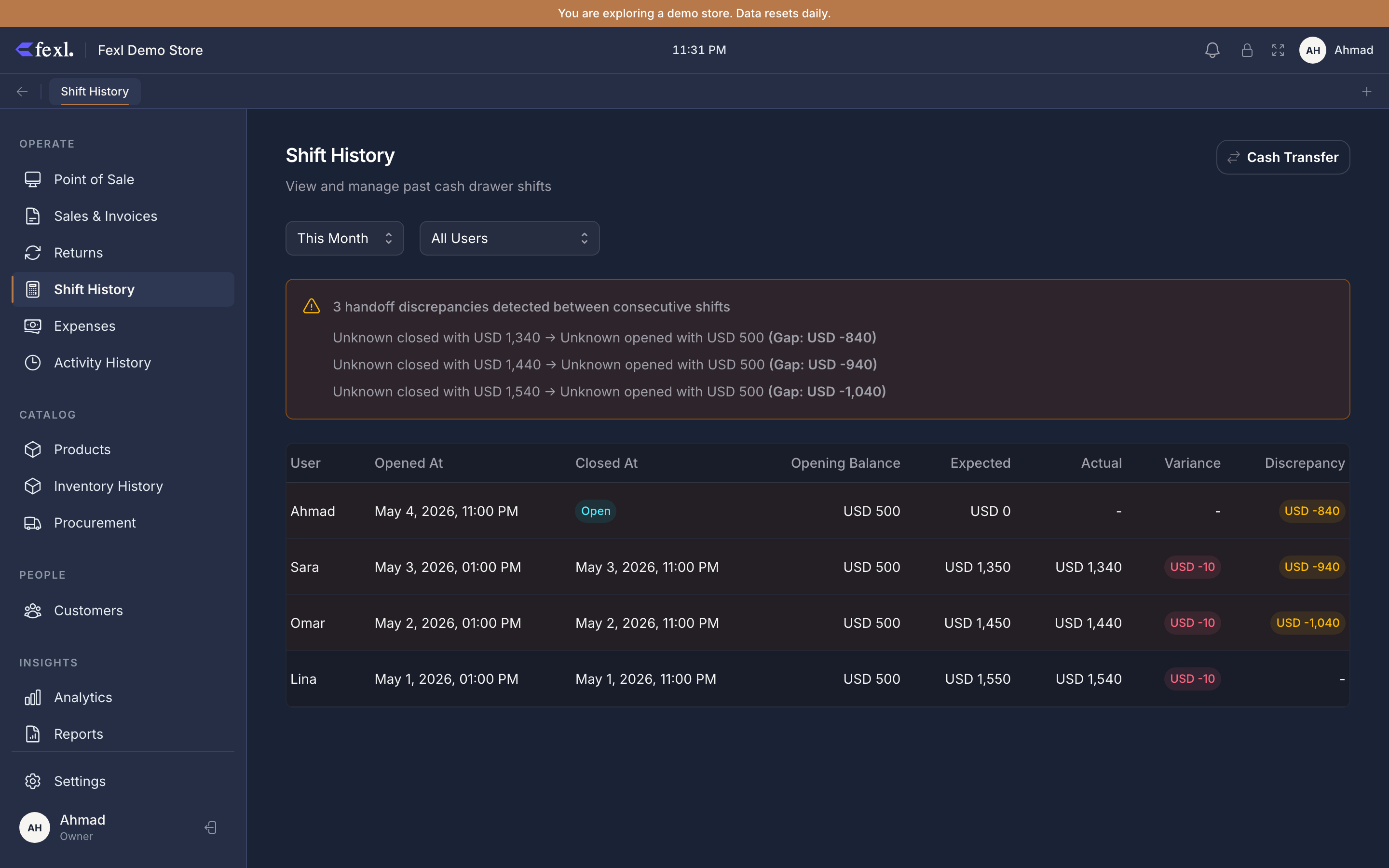
How a gap is detected
When you open a shift, Fexl Lite checks the most recent closed shift on the same cash sub-account. If that closed shift’s actual_closing doesn’t match the new shift’s opening_balance within 0.01, the gap shows on the shift row with an alert icon, and the shift detail panel breaks it down:
previous shift #1283 closed at 812.00this shift #1284 opened at 755.00gap −57.00The check ignores transfers and cash-in / cash-out adjustments posted between the two shifts — those are accounted-for movements, not gaps. The detector only flags the residual difference after every legitimate movement is taken into account.
What a gap means
A gap is a signal, not a verdict. Real causes, in rough order of frequency:
- Someone took or added cash and didn’t log it. Petty cash withdrawal that wasn’t recorded, change-fund top-up by a manager who didn’t post the cash-in.
- The previous shift’s close count was wrong. Cashier miscounted; the actual amount in the drawer was always what the new shift is reading.
- The new shift’s opening count is wrong. The opener miscounted at the start.
- A different cashier ran sales on the closed shift overnight. The morning cashier opened the till on the previous (still-open) shift instead of opening their own — every overnight transaction is on the prior shift, the close happened later, and the next “real” open shows a gap.
- Theft. Smaller amounts, recurring on the same drawer, same cashier.
How to investigate
Open the gap row in Shift History
The shift with the alert icon — click into the detail panel.
Compare prior close vs this open
Read the prior shift’s transaction log. Was there a cash-out logged near close? Was the close timestamp the next morning (i.e. did someone leave it open overnight)? Walk every cash transaction; the running balance against the prior shift’s actual_closing will tell you whether the prior shift’s close itself was suspect.
Check for missing adjustments between the two
If a known transfer or cash-out happened in the gap period and wasn’t logged, post the missing adjustment now on the new shift with a clear note: reconciling gap with shift #1283 — supplier paid $57 in cash, not logged at the time. The new shift’s expected drops by that amount, and the gap is explained.
If the gap is unexplained, document it and decide
Sometimes the gap stays a mystery. Decide whether to absorb it through 5060 Cash Over-Short (or 7050) by posting a manual JE — DR 5060 (the loss), CR 1010-xxx (the cash sub-account) — so the books reflect the real cash on hand. The gap won’t show up on future opens because the cash sub-account’s expected balance now matches the count again.
What the alert does, and what it doesn’t
How “expected” handles the gap
The new shift’s expected calculation uses the new shift’s opening_balance — the count the opener entered, not the prior shift’s closing. So if the opener counted $755 and rings $200 in cash sales, expected at close is $955. The gap doesn’t poison the new shift’s variance — it’s a separate signal on the shift row, not folded in to expected.
If the gap is later resolved with a posted cash adjustment (Step 3 above), the shift’s expected updates to reflect it. If the gap is absorbed via a manual JE on Cash Over-Short, the shift’s expected is unchanged — the JE is bookkeeping, not a cash movement.
Patterns to watch for
The Cash Drawer Report aggregates gaps across many shifts. Sort by sub-account and look for one of these:
- One drawer, one cashier, recurring negative gaps — the strongest theft signal Fexl Lite produces. Talk to the cashier; consider rotating drawer assignments; review camera footage for the shifts in question.
- Same gap on the same time of day, different cashiers — often points at a procedural problem (the closing routine doesn’t include a count, or the morning routine routinely tops up from a stash that isn’t logged).
- Gaps that always self-correct (positive then negative) — usually a counting habit, not theft. Coach the cashier on counting protocols.
Related
Open & close a shift
The flow that produces the closing count the gap is checked against.
Cash adjustments
The right way to log a missing cash-in / cash-out from a gap period.
Cash Drawer Report
Variance trends across many shifts.
Journal entries
The Cash Over-Short JE pattern for absorbing unexplained gaps.