

AR / AP Aging
The AR / AP Aging report answers two questions a finance person asks every Monday: who owes us, and how long has it been? Two tabs — Accounts Receivable for what customers owe you, Accounts Payable for what you owe suppliers — with the same five-bucket aging shape on each.
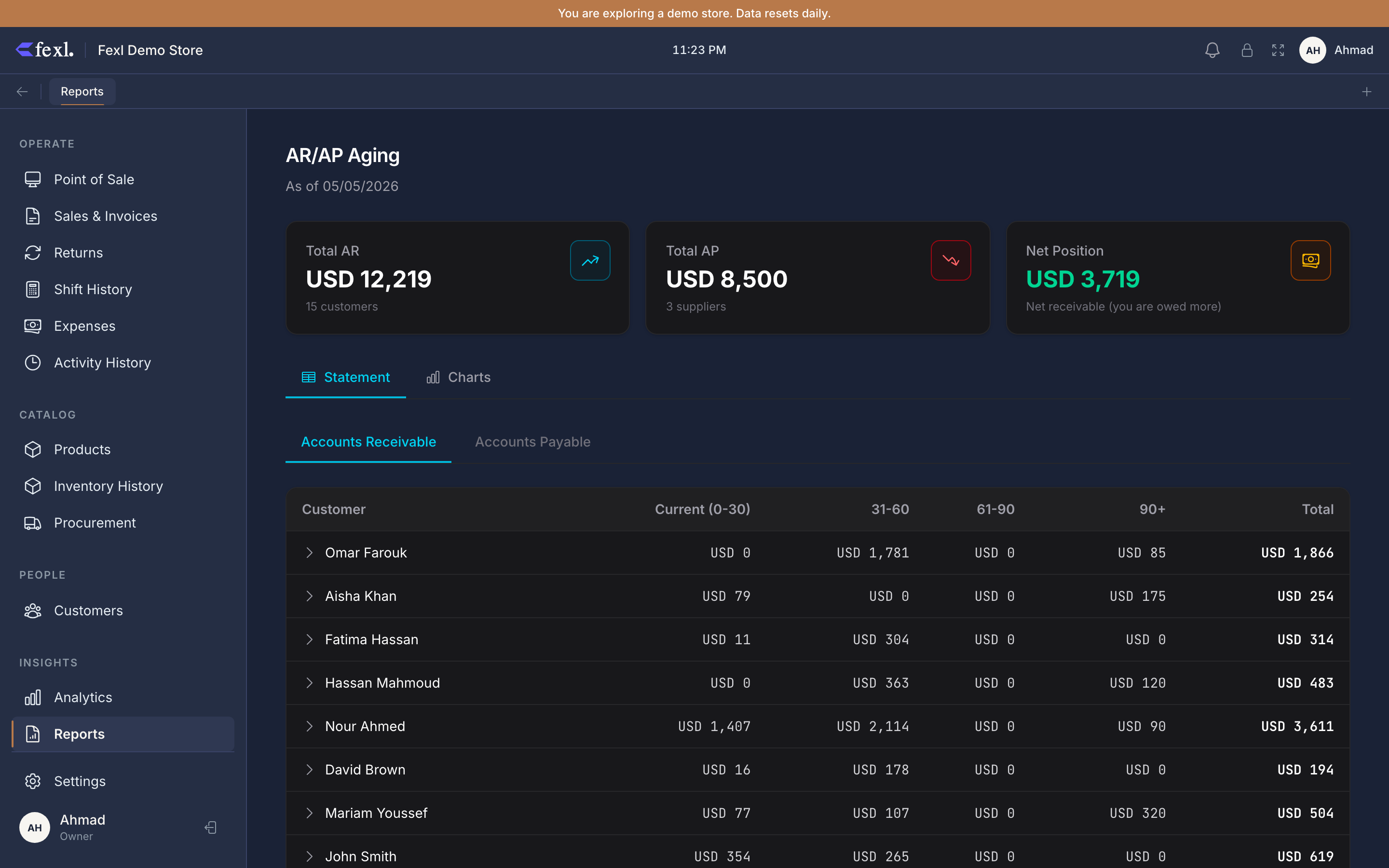
The five aging buckets
Every unpaid invoice on the page falls into exactly one bucket, computed as today − invoice.date:
- Current — 0 to 30 days old. Healthy.
- 1-30 — 1 to 30 days past the current window’s edge. Still routine.
- 31-60 — overdue territory. The first call is due.
- 61-90 — chase actively. Most stores stop extending fresh credit at this age.
- 90+ — written-off territory. Decide whether you’re still collecting or whether this is a bad-debt expense.
Each bucket column shows the dollar total per counterparty; the Total Owed column on the right is the sum across buckets — and the row colour tracks the worst (oldest) bucket the counterparty has money in. A customer with everything in Current stays neutral; a customer with anything in 90+ flips amber.
Accounts Receivable tab
One row per customer with an outstanding balance. Source: every non-cancelled, non-comp invoice with amount_owed > 0, plus opening balances on customer records. The balance reconciles to GL account 1100 on the Trial Balance — if Total AR on this report doesn’t match the 1100 Trial Balance row, that’s a sign an invoice posted without its AR leg.
Click any row to expand the customer’s invoice list — invoice number, date, total, paid, owed, age in days. Click an invoice to jump to its detail page.
The summary cards above the table show Total AR, Current, Overdue (sum of 1-30 / 31-60 / 61-90 / 90+), and 90+ on its own. Overdue ÷ Total AR is the cleanest health number on the page — a healthy retail tenant runs under 15%.
Accounts Payable tab
Same shape, mirrored. One row per supplier with an outstanding balance, source: max(supplier.opening_balance + (owed − paid), 0) per supplier from the supplier-payment ledger. Reconciles to GL account 2010 on the Trial Balance.
Expand a row for the per-PO breakdown — purchase order number, date, total cost, paid, owed, age. The age clock starts on the PO receive date, not the order date, since that’s when the liability lands on the books.
Date and counterparty filters
A single date in the header sets the as-of date — by default, today. Pick a past date to ask “what did the aging look like at month-end?” Every bucket recomputes from that date as the reference point.
The search box above the table filters by counterparty name. Useful when a single customer or supplier dominates and you want to drop everyone else off the page for printing.
Reconciling against the Balance Sheet
Export
The CSV button dumps the visible tab as a flat list — counterparty name, current, 1-30, 31-60, 61-90, 90+, total. Switch tabs to export the other side.