

Sales settings
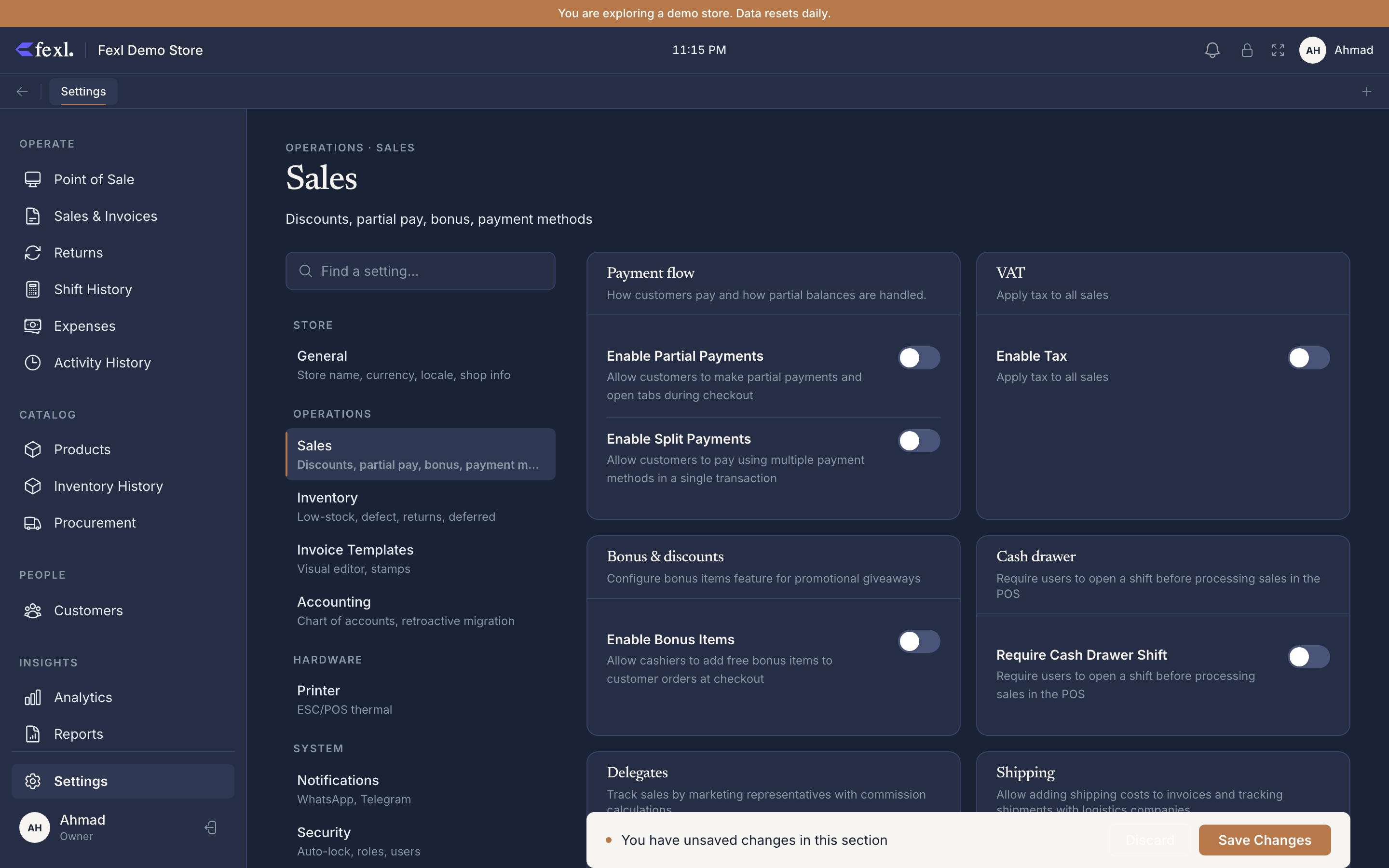
The Sales tab is the rule-set the cashier inherits at POS — which payment methods appear in the checkout sheet, whether they can split or part-pay, what tax gets added, and how commission is tracked. Most of these settings take effect on the next sale; none of them retroactively rewrite historical invoices.
Payment methods
The Payment Methods card at the bottom of the Sales tab is a CRUD list. Each method has three fields: a name (free text — Cash, Card, Transfer, Bouncer, anything you like), an Active toggle, and an Account Type mapped to a ledger account code:
- Cash Safe (1010) — physical cash. Sales paid this way move through cash drawer shifts and show on the Cash Drawer Report.
- Bank Account (1020) — card terminals, bank transfers, checks. Skips the cash drawer; lands directly on the bank ledger.
- Wallet (1030) — mobile wallet / e-money. Same skip-the-drawer behaviour as Bank, separate ledger line.
If the table is empty there is an Add default methods button that seeds Cash + Card. Otherwise use + Add method in the header. The edit pencil only changes the Account Type — to rename a method, delete and re-add.
Partial payments
Enable Partial Payments — when on, the checkout offers a Partial / Pay later path: customer pays less than the total (or zero), the unpaid amount lands on the customer’s tab as amountOwed, and the invoice posts a debit to Accounts Receivable (1100). There is no per-customer max-debt cap in this tab — credit limit policy is handled per-customer (see Pay Later & COD).
When disabled, the checkout sheet hides the partial path entirely — every sale must be paid in full at the moment of ringing.
Split payments
Enable Split Payments — when on, a single sale can be paid with multiple methods (e.g. $30 cash + $20 card on a $50 invoice). The checkout sheet shows an “Add another method” affordance under the first method picker. Each method’s amount writes its own line in the journal entry, debiting its mapped account. See Full, partial & split payments for the cashier flow.
Off by default — many shops only need one method per ring.
VAT (tax)
- Enable Tax — global on/off. When off, no tax is added to any sale and the VAT line disappears from invoice templates.
- Tax Rate — single percentage applied to the subtotal. Stored as a number (e.g.
5for 5%,15for 15%). One rate per tenant — there are no per-product tax classes.
The behaviour is “tax on top”: subtotal is the sum of quantity × price, VAT is computed against that, and the total is subtotal + VAT. Iraq sellers commonly run with tax disabled (VAT not collected at retail); LatAm sellers with 15–19 depending on jurisdiction. Changing the rate mid-day affects only invoices created after the save.
Bonus items
Enable Bonus Items — adds a Bonus toggle on each cart line at POS, letting the cashier flag specific units as freebies. Bonus units come off stock and contribute zero to the invoice subtotal.
When enabled, two sub-fields appear:
- Track Cost of Bonus Items — when on, the COGS for the bonus units is still recognised against an expense account (so margin stays honest). When off, bonus units leave inventory at zero cost — fine for sample/promo SKUs you carry at zero anyway.
- Bonus Limit Per Session — caps the total retail value of bonus items per single sale. Leave empty for no limit.
See Bonus items for the cashier-facing flow and FIFO costing for how the bonus split lands in COGS.
Delegates
Enable Delegates — turns on the marketing-rep / outside-sales tracking model. With it on, every invoice can carry a delegateId; the delegate’s commission is calculated from invoice totals and lands on Commission Expense (6070) at month-end.
Sub-toggle:
- Show Delegate on Invoice — prints the delegate’s name on the A4 / thermal invoice templates. Off by default; turn on if your delegates need their name on the customer copy.
Per-delegate commission rates and stats live on the Delegates page itself, not here. See Delegates.
Cash drawer, shifts & shipping
Three more toggles round out the tab. Require cash drawer shift blocks cash payments unless a shift is open and records closing variance against the Cash Drawer Variance Threshold; the nested Enable Cash Sub-Accounts splits 1010 into per-staff sub-accounts (1010-001, 1010-002, …) for handoff reconciliation. Enable Shipping exposes the shipping cost field on invoices plus the Shipping page (companies + tier pricing).
Returns and deferred revenue
These two settings actually live on the Inventory tab in the current build, but they are sales-rule adjacent and worth flagging:
- Enable Returns + Return Window (days) — turn returns on/off and set a time-window after which the Return wizard refuses to accept the invoice. Leave the window empty for no limit.
- Enable Deferred Revenue + Default Deferral Period (days) — when on, sales of products marked as deferred (subscriptions, prepaid services) land on the deferred-revenue liability account and recognise into revenue over the period. See Deferred revenue.
There is no separate “approval threshold” field for high-value returns — every return goes through the same wizard and is gated by the user’s returns.create permission instead.
What’s permission-gated
Related
- Invoice templates — print layout for the rules set here
- Security & permissions — who can edit the Sales tab
- Accounting settings — chart of accounts behind ledger codes
- Full, partial & split payments — the checkout flow these toggles drive
- Return wizard — how the return window is enforced
- Pay Later & COD — the partial-payments path in detail