

Shifts & Cash Drawer
A shift in Fexl Lite is the bracket around a cashier’s stint at the till: open with a counted opening balance, ring sales and refunds and expenses against it, then close by counting the actual cash on hand against what the system expected. The difference — the variance — is what every shift report leads with, because that’s the number worth investigating.
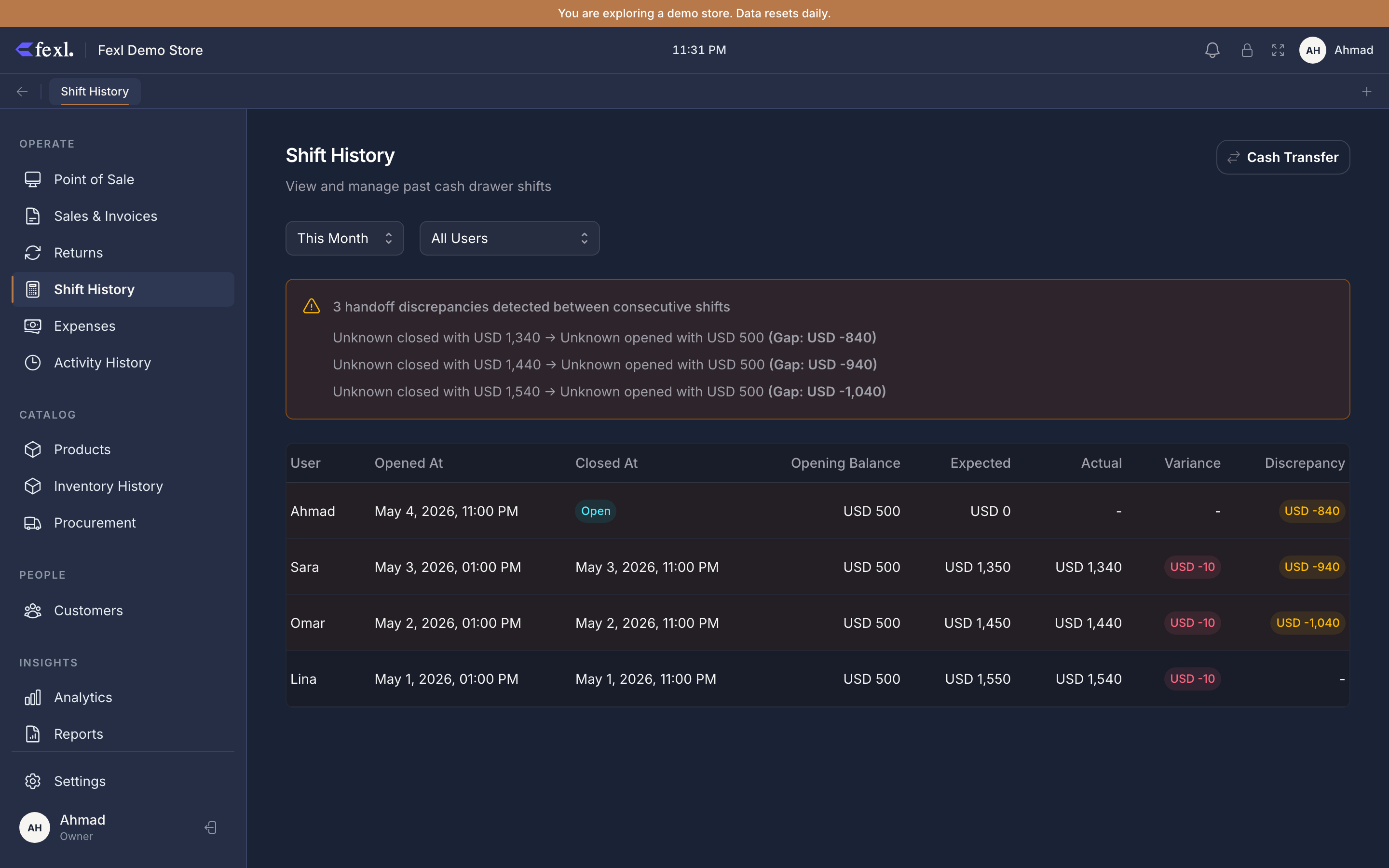
What’s on the Shift History page
Each row is one shift. The default range is This month, with presets for Today / This Week / This Month / This Quarter / This Year and a custom date picker. The user filter narrows down to a single cashier — handy on a multi-till day.
Per-row columns:
- Opened / Closed — the start and end timestamps. Open shifts show “Open” instead of a closed time.
- User — the cashier who opened it. The closed-by user is recorded separately and surfaces on the detail panel.
- Opening — the cash counted on opening. Always required; this anchors every later expectation.
- Expected — what the system says should be in the drawer right now: opening + sales + cash-in − refunds − expenses − cash-out. Recomputed live for open shifts; frozen at close.
- Actual — only set when the shift is closed. The cashier counted this amount.
- Variance —
actual − expected. Green if positive (more in the till than expected), rose if negative (less). Zero means the count matched.
A row is clickable: it opens a side panel with the per-transaction breakdown — every sale, refund, expense, and cash adjustment that hit this shift, in chronological order, with the user who posted it.
What “Expected” actually means
Fexl Lite recomputes expected on the fly from the shift’s transactions:
expected = openingBalance + Σ sale.amount + Σ cash_in.amount − Σ refund.amount − Σ expense.amount − Σ cash_out.amountPay-later (debt) sales do not increase expected — the customer didn’t hand over cash. They surface as a separate payLater line on the shift summary so you know the till had n debt rings without expecting cash for them.
Card and bank-transfer payments are tracked too, but they don’t move cash sub-accounts — only the cash leg does. A shift that took 100% card payments will have an expected that equals just the opening balance (plus any cash adjustments). That’s correct.
The cash sub-account model
Every cash transaction posts to a 1010-* sub-account of 1010 Cash. Most stores run with one default sub-account, but multi-cashier or multi-drawer setups use one per cashier:
1010-001— counter cash (default).1010-002— Osama’s drawer.1010-006— AboYahya’s collection till.
Sub-accounts are configured in Settings → Sales → Cash & Drawer (see the Sales settings page). When a shift opens, it’s tied to one sub-account; every cash leg from that shift posts to that sub-account. The Balance Sheet sums all 1010-* rows back into the parent 1010 Cash balance — so the consolidated number is always correct, even with multiple drawers running simultaneously.
This matters most for stores running the AboYahya → Osama daily pattern: AboYahya collects throughout the day in 1010-006, then transfers the day’s takings to 1010-002 at end of day. The transfer is a cash-out from one and a cash-in to the other — net zero across cash, but each sub-account ledger now reflects the real movement.
Handoff gaps
When two consecutive shifts come from different cashiers (or from the same cashier at different times), the closing of the previous shift should equal the opening of the next one — they’re counting the same drawer. If they don’t, that’s a handoff gap: someone took or added cash between shifts and didn’t log it.
Fexl Lite computes gaps automatically when listing shifts: for each shift, it compares this shift’s opening balance against the previous shift’s actual closing. If the difference is >= 0.01, the gap shows on the row with an alert icon. The detail panel breaks it down — “previous shift closed at X, this one opened at Y, gap = Y − X.”
See Handoff gaps for the full diagnostic flow.
Deep dives
Open & close a shift
The two-button flow with the variance-and-note dialog. Step-by-step.
Cash adjustments
Cash-in (deposit) and cash-out (withdraw) during a live shift. How they affect expected and the JE on each.
Cash transfers between sub-accounts
Move cash from one drawer to another (AboYahya → Osama). One transfer, two sub-account legs, zero net cash.
Handoff gaps
What it means, how to investigate, and how to reconcile a real gap into the next shift’s opening balance.
Related
- Sales settings — payment methods & cash sub-accounts — where 1010-* mapping is configured
- Cash Drawer report — variance trends across many shifts
- Balance Sheet — sum-of-sub-accounts derivation
- General Ledger — every cash leg ever posted, filterable by sub-account code