

Returns & Defects
Every store has returns. Fexl Lite makes them predictable: one wizard, the same five steps every time, three clean dispositions, and a downstream defect track for the units you can’t put back on the shelf.
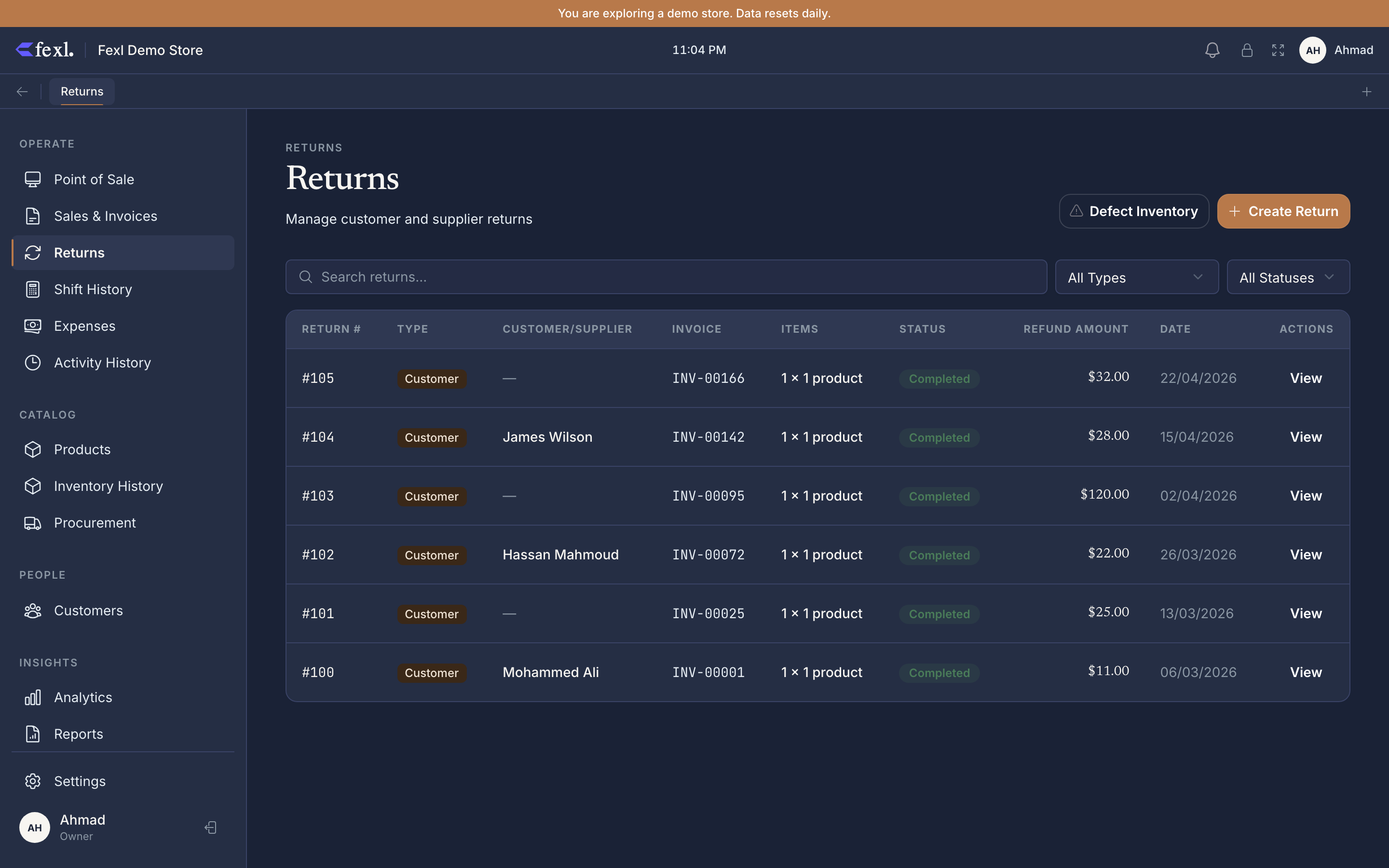
The Returns page is the audit trail: every refund you’ve issued, customer and supplier alike, with type, status, item count, refund amount, and a one-click jump back to the original invoice. The two filters on top (Type and Status) plus a search across return ID, customer / supplier name, and reason text cover almost every “find that return from last week” question.
The 5-step wizard at a glance
Hit Create Return on the Returns page (or Ctrl R from the POS) and the wizard walks you through the same five steps every time:
- Invoice — find the original sale by barcode, invoice number, or customer.
- Products — pick which lines to return, set quantities, choose specific IMEIs for serialised items.
- Condition — assign each returned unit to one of three dispositions (resaleable / defect / dispose).
- Defects — for any defect units, route them to the supplier or hold for inspection. Skipped if nothing was flagged.
- Confirm — pick refund method (cash, card, or store credit) and post the journal entry.
The full mechanics — accounting entries posted at step 5, partial-vs-full cancellation rules, the pending-status fallback when a card terminal disconnects mid-refund — live on the 5-step return wizard deep dive.
The three dispositions
At step 3 you assign every returned unit to one of three buckets, and the disposition counts must sum to the line’s return quantity:
- Resaleable — the unit goes back to regular stock at its original FIFO cost layer. Available to sell again immediately.
- Defect — the unit moves to Defect Inventory, a separate holding area. It does not return to sellable stock.
- Dispose — the unit is written off on the spot. Cost moves to the disposal expense account; nothing to track downstream.
Bonus units (BOGO, free gifts) get split-costed automatically: bonus-allocated cost flows to account 5020, regular FIFO cost to 5010. #40 v1.6.100 made the defect-egress write follow the same split. See item dispositions for the per-bucket rules.
What happens to defects
Anything you marked Defect lands on the Defect Inventory page with status pending. From there you bulk-select pending items and route them to a supplier as an RMA — status flips through Pending → Awaiting Shipment → Sent to Supplier → Resolved. Each transition keeps the audit trail tight: you always know which units are with which supplier and what’s still on your shelf waiting for inspection.
The four-state lifecycle, the supplier-routing dialog, and the per-unit serial / batch tracking are covered on defect inventory & supplier RMA.
Credit refunds
Same wizard, same five steps — at step 5 you pick Store credit instead of cash or card. The accounting flips: instead of crediting cash (1010), the refund credits the customer-credits liability account (2100), building the customer’s running balance. They can spend it on their next visit or withdraw it any time from the customer detail page.
Debt deductions work the same way — if the customer already owes you money, the refund pays down their accounts-receivable balance instead of generating new credit. Both paths share the wizard; only the settlement account changes. Full mechanics on credit refunds.
Deep dives
The 5-step return wizard
Step-by-step walkthrough of every refund: invoice lookup, line picker, dispositions, defect routing, settlement. The page to bookmark.
Resaleable, defect, dispose
The three buckets at step 3, what each one writes to inventory and the books, and how bonus units get split-costed.
Defect inventory & supplier RMA
The four-state lifecycle, bulk-routing to suppliers, per-unit tracking on serialised and batched items.
Credit refunds & debt deductions
Same wizard, different settlement account. How the customer’s running balance is built and drawn down.
Related
- Cancel an invoice — when a partial refund isn’t enough
- Customer debt & store credit — the running balance store credits build
- FIFO costing — how returned units land back on the right cost layer
- Returns settings — disable returns, set the time-window, configure approval thresholds
- Release notes — v1.6.100 — the four refund-related fixes shipped this version